
Tech-Protect Glass Fit+ Samsung Galaxy Tab S12+ Plus 12.6 X840 / X846b Clear [2 PACK]
![Tech-Protect Glass Fit+ Samsung Galaxy Tab S12+ Plus 12.6 X840 / X846b Clear [2 PACK] - 1](/_next/image?url=https%3A%2F%2Fpresta-b2b.homescreen.pl%2Fimg%2Fp%2F8%2F8%2F4%2F5%2F8%2F0%2F884580-thickbox_default.jpg&w=1200&q=75)
![Tech-Protect Glass Fit+ Samsung Galaxy Tab S12+ Plus 12.6 X840 / X846b Clear [2 PACK] - 2](/_next/image?url=https%3A%2F%2Fpresta-b2b.homescreen.pl%2Fimg%2Fp%2F8%2F8%2F4%2F5%2F8%2F1%2F884581-thickbox_default.jpg&w=1200&q=75)
![Tech-Protect Glass Fit+ Samsung Galaxy Tab S12+ Plus 12.6 X840 / X846b Clear [2 PACK] - 3](/_next/image?url=https%3A%2F%2Fpresta-b2b.homescreen.pl%2Fimg%2Fp%2F8%2F8%2F4%2F5%2F8%2F2%2F884582-thickbox_default.jpg&w=1200&q=75)
![Tech-Protect Glass Fit+ Samsung Galaxy Tab S12+ Plus 12.6 X840 / X846b Clear [2 PACK] - 4](/_next/image?url=https%3A%2F%2Fpresta-b2b.homescreen.pl%2Fimg%2Fp%2F8%2F8%2F4%2F5%2F8%2F3%2F884583-thickbox_default.jpg&w=1200&q=75)
![Tech-Protect Glass Fit+ Samsung Galaxy Tab S12+ Plus 12.6 X840 / X846b Clear [2 PACK] - 5](/_next/image?url=https%3A%2F%2Fpresta-b2b.homescreen.pl%2Fimg%2Fp%2F8%2F8%2F4%2F5%2F8%2F4%2F884584-thickbox_default.jpg&w=1200&q=75)
![Tech-Protect Glass Fit+ Samsung Galaxy Tab S12+ Plus 12.6 X840 / X846b Clear [2 PACK] - 6](/_next/image?url=https%3A%2F%2Fpresta-b2b.homescreen.pl%2Fimg%2Fp%2F8%2F8%2F4%2F5%2F8%2F5%2F884585-thickbox_default.jpg&w=1200&q=75)
![Tech-Protect Glass Fit+ Samsung Galaxy Tab S12+ Plus 12.6 X840 / X846b Clear [2 PACK] - 7](/_next/image?url=https%3A%2F%2Fpresta-b2b.homescreen.pl%2Fimg%2Fp%2F8%2F8%2F4%2F5%2F8%2F6%2F884586-thickbox_default.jpg&w=1200&q=75)
![Tech-Protect Glass Fit+ Samsung Galaxy Tab S12+ Plus 12.6 X840 / X846b Clear [2 PACK] - 8](/_next/image?url=https%3A%2F%2Fpresta-b2b.homescreen.pl%2Fimg%2Fp%2F8%2F8%2F4%2F5%2F8%2F7%2F884587-thickbox_default.jpg&w=1200&q=75)
![Tech-Protect Glass Fit+ Samsung Galaxy Tab S12+ Plus 12.6 X840 / X846b Clear [2 PACK] - 9](/_next/image?url=https%3A%2F%2Fpresta-b2b.homescreen.pl%2Fimg%2Fp%2F8%2F8%2F4%2F5%2F8%2F8%2F884588-thickbox_default.jpg&w=1200&q=75)
![Tech-Protect Glass Fit+ Samsung Galaxy Tab S12+ Plus 12.6 X840 / X846b Clear [2 PACK] - 10](/_next/image?url=https%3A%2F%2Fpresta-b2b.homescreen.pl%2Fimg%2Fp%2F8%2F8%2F4%2F5%2F8%2F9%2F884589-thickbox_default.jpg&w=1200&q=75)
Description
SzkŁo Hartowane Tech-protect Glass Fit+ 2-pack Galaxy Tab S12+ Plus 12.4 X840 / X846b Clear
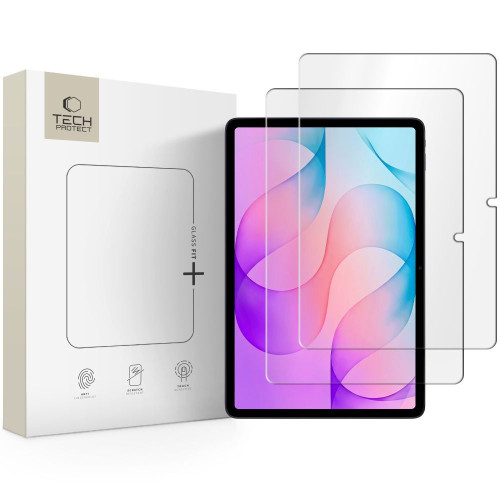
Tempered Glass Tech-Protect Glass Fit+ 2-pack Galaxy Tab S12+ Plus 12.4 X840 / X846b is a product that combines effective screen protection with an aesthetic appearance. Thanks to precise workmanship and minimal thickness, the glass is practically invisible on the screen, maintaining full touch sensitivity.
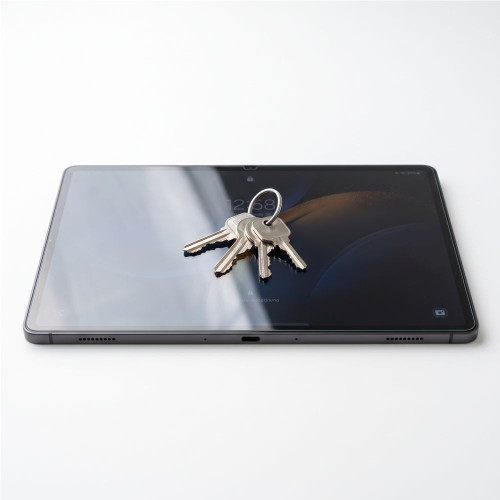
High hardness 9H
The glass has a hardness of 9H, which means it is resistant to scratches from keys, coins, and other sharp objects. In everyday use, this translates to long-lasting protection of the screen against mechanical damage.
Minimal thickness 0.3 mm
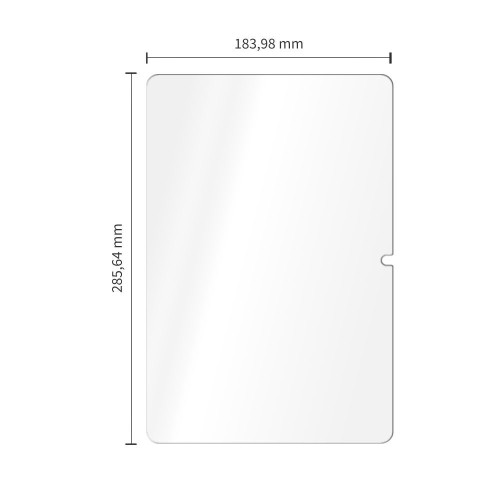
The thickness of the glass is only 0.3 mm, which means it does not change the profile of the device and does not affect the responsiveness of the screen. The user will not notice a difference in touch, and the screen will remain fully functional.
Oleophobic coating
The glass is coated with an oleophobic layer that reduces the accumulation of fingerprints. This makes it easier to keep the screen clean, and the image remains clear and transparent.
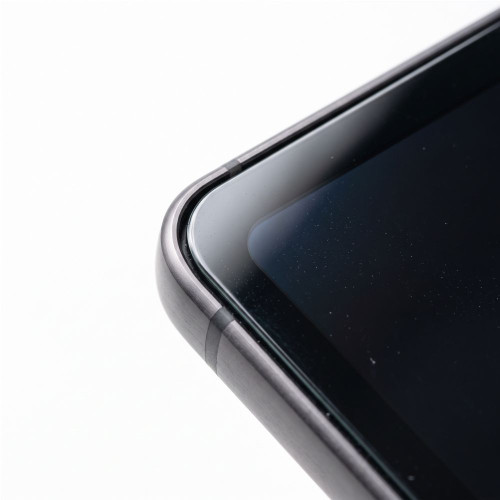
Precisely milled edges
The edges of the glass have been precisely milled, ensuring an aesthetic appearance and comfort of use. The glass adheres well to the screen, causing no discomfort while using the device.

Compatibility with cases
The design of the glass is compatible with most available cases, allowing for free use of additional protection and personalization of the device's appearance without the need to remove the glass.

Key features
- Thickness of only 0.3 mm
- Precisely milled edges
- Compatible with most cases
Specifications
| Type | Tempered glass |
| Coating | Oleophobic |
| Hardness | 9H |
| Dimensions | 285.64 x 183.98 mm |
| Compatibility | Samsung Galaxy Tab S12+ Plus 12.4 X840 / X846B |
In the box
- 2 × Tempered glass Tech-Protect Glass Fit+
- 2 × Installation kit
Installation guide
- Start the installation in the bathroom right after a shower - the steam will absorb all the dust from the atmosphere and it will not interfere with your installation.
- Thoroughly clean and degrease the surface of the screen, then polish it to a shine with a dry cloth.
- Install the coating as evenly as you can - you can position it using two strips, sticking them to the side of the device.
- Get rid of air bubbles by pressing the whole thing firmly in circular motions for several seconds. Do this so that the adhesive layer bonds with the screen as strongly as possible.
Description
SzkŁo Hartowane Tech-protect Glass Fit+ 2-pack Galaxy Tab S12+ Plus 12.4 X840 / X846b Clear
Tempered Glass Tech-Protect Glass Fit+ 2-pack Galaxy Tab S12+ Plus 12.4 X840 / X846b is a product that combines effective screen protection with an aesthetic appearance. Thanks to precise workmanship and minimal thickness, the glass is practically invisible on the screen, maintaining full touch sensitivity.
High hardness 9H
The glass has a hardness of 9H, which means it is resistant to scratches from keys, coins, and other sharp objects. In everyday use, this translates to long-lasting protection of the screen against mechanical damage.
Minimal thickness 0.3 mm
The thickness of the glass is only 0.3 mm, which means it does not change the profile of the device and does not affect the responsiveness of the screen. The user will not notice a difference in touch, and the screen will remain fully functional.
Oleophobic coating
The glass is coated with an oleophobic layer that reduces the accumulation of fingerprints. This makes it easier to keep the screen clean, and the image remains clear and transparent.
Precisely milled edges
The edges of the glass have been precisely milled, ensuring an aesthetic appearance and comfort of use. The glass adheres well to the screen, causing no discomfort while using the device.
Compatibility with cases
The design of the glass is compatible with most available cases, allowing for free use of additional protection and personalization of the device's appearance without the need to remove the glass.
Key features
- Thickness of only 0.3 mm
- Precisely milled edges
- Compatible with most cases
Specifications
| Type | Tempered glass |
| Coating | Oleophobic |
| Hardness | 9H |
| Dimensions | 285.64 x 183.98 mm |
| Compatibility | Samsung Galaxy Tab S12+ Plus 12.4 X840 / X846B |
In the box
- 2 × Tempered glass Tech-Protect Glass Fit+
- 2 × Installation kit
Installation guide
- Start the installation in the bathroom right after a shower - the steam will absorb all the dust from the atmosphere and it will not interfere with your installation.
- Thoroughly clean and degrease the surface of the screen, then polish it to a shine with a dry cloth.
- Install the coating as evenly as you can - you can position it using two strips, sticking them to the side of the device.
- Get rid of air bubbles by pressing the whole thing firmly in circular motions for several seconds. Do this so that the adhesive layer bonds with the screen as strongly as possible.
Customers also bought
Frequently bought together
