
Tech-Protect Glass Fit+ Dji Osmo Action 6 Clear [2 PACK]
![Tech-Protect Glass Fit+ Dji Osmo Action 6 Clear [2 PACK] - 1](/_next/image?url=https%3A%2F%2Fpresta-b2b.homescreen.pl%2Fimg%2Fp%2F8%2F6%2F2%2F1%2F1%2F4%2F862114-thickbox_default.jpg&w=1200&q=75)
![Tech-Protect Glass Fit+ Dji Osmo Action 6 Clear [2 PACK] - 2](/_next/image?url=https%3A%2F%2Fpresta-b2b.homescreen.pl%2Fimg%2Fp%2F8%2F6%2F2%2F1%2F1%2F5%2F862115-thickbox_default.jpg&w=1200&q=75)
![Tech-Protect Glass Fit+ Dji Osmo Action 6 Clear [2 PACK] - 3](/_next/image?url=https%3A%2F%2Fpresta-b2b.homescreen.pl%2Fimg%2Fp%2F8%2F6%2F2%2F1%2F1%2F6%2F862116-thickbox_default.jpg&w=1200&q=75)
![Tech-Protect Glass Fit+ Dji Osmo Action 6 Clear [2 PACK] - 4](/_next/image?url=https%3A%2F%2Fpresta-b2b.homescreen.pl%2Fimg%2Fp%2F8%2F6%2F2%2F1%2F1%2F7%2F862117-thickbox_default.jpg&w=1200&q=75)
![Tech-Protect Glass Fit+ Dji Osmo Action 6 Clear [2 PACK] - 5](/_next/image?url=https%3A%2F%2Fpresta-b2b.homescreen.pl%2Fimg%2Fp%2F8%2F6%2F2%2F1%2F1%2F8%2F862118-thickbox_default.jpg&w=1200&q=75)
Description
Product Description
Tech-Protect Glass Fit+ is tempered glass that combines protection with aesthetics. Precisely milled edges and minimal thickness make the glass almost disappear on the screen while maintaining full touch sensitivity.
A hardness of 9H on a ten-point scale means the glass withstands contact with keys, coins, and other sharp objects. With a thickness of just 0.3 mm, it practically does not alter the profile and does not affect the screen's responsiveness. The tempered material disperses impact force, protecting the display from cracks during falls.
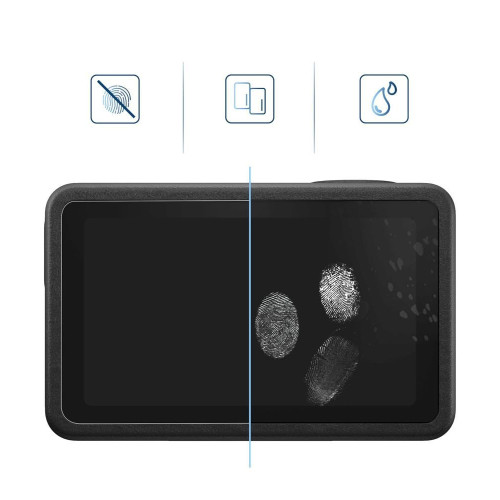
The oleophobic coating minimizes fingerprint accumulation and makes it easier to keep the glass clean. Crystal clarity preserves natural colors and sharpness of the image.
Product Features
- 100% Original
- Packaged in original packaging
- Glass hardness 9H
- Thickness of only 0.3 mm
- Oleophobic coating reducing fingerprints
- Precisely milled edges
Specifications
| Model | Glass Fit+ |
| Compatibility | DJI Osmo Action 6 |
| Type | Tempered Glass |
| Hardness | 9H |
| Coating | Oleophobic |
| Dimensions (large display) | 62.90 × 36.90 mm |
| Dimensions (small display) | 33.10 × 31.10 mm |
| Dimensions (lens) | ø34 mm |
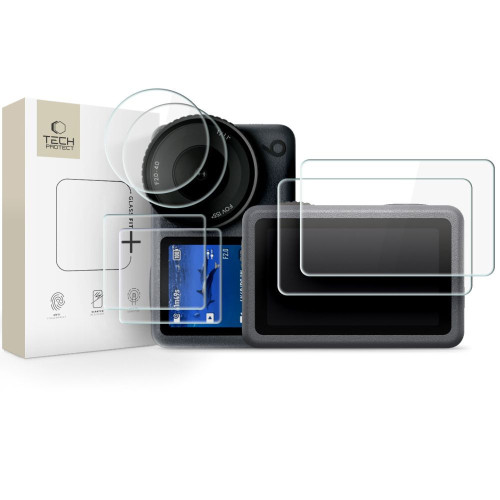
| Quantity in set | 6 pcs. (2 × large display + 2 × small display + 2 × lens) |
The set includes
- 2 × Glass for large display Tech-Protect Glass Fit+
- 2 × Glass for small display Tech-Protect Glass Fit+
- 2 × Glass for lens Tech-Protect Glass Fit+
- 2 × Installation kit
Installation Instructions
1. Start the installation in the bathroom right after a shower – the steam will absorb all the dust from the air and it will not interfere with your installation.
2. Clean and degrease the screen surface thoroughly, then polish it to a shine with a dry cloth.
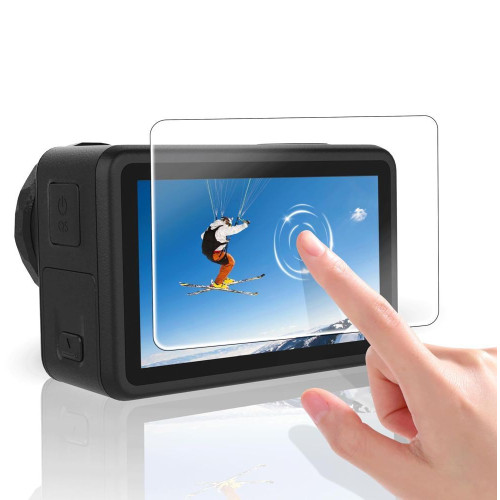
3. Install the coating as evenly as possible – you can position it using two strips of tape, sticking them to the side of the device.
4. Remove air bubbles by pressing down the entire surface in circular motions for several seconds. Do this to ensure that the adhesive layer bonds as strongly as possible with the screen.
Description
Product Description
Tech-Protect Glass Fit+ is tempered glass that combines protection with aesthetics. Precisely milled edges and minimal thickness make the glass almost disappear on the screen while maintaining full touch sensitivity.
A hardness of 9H on a ten-point scale means the glass withstands contact with keys, coins, and other sharp objects. With a thickness of just 0.3 mm, it practically does not alter the profile and does not affect the screen's responsiveness. The tempered material disperses impact force, protecting the display from cracks during falls.
The oleophobic coating minimizes fingerprint accumulation and makes it easier to keep the glass clean. Crystal clarity preserves natural colors and sharpness of the image.
Product Features
- 100% Original
- Packaged in original packaging
- Glass hardness 9H
- Thickness of only 0.3 mm
- Oleophobic coating reducing fingerprints
- Precisely milled edges
Specifications
| Model | Glass Fit+ |
| Compatibility | DJI Osmo Action 6 |
| Type | Tempered Glass |
| Hardness | 9H |
| Coating | Oleophobic |
| Dimensions (large display) | 62.90 × 36.90 mm |
| Dimensions (small display) | 33.10 × 31.10 mm |
| Dimensions (lens) | ø34 mm |
| Quantity in set | 6 pcs. (2 × large display + 2 × small display + 2 × lens) |
The set includes
- 2 × Glass for large display Tech-Protect Glass Fit+
- 2 × Glass for small display Tech-Protect Glass Fit+
- 2 × Glass for lens Tech-Protect Glass Fit+
- 2 × Installation kit
Installation Instructions
1. Start the installation in the bathroom right after a shower – the steam will absorb all the dust from the air and it will not interfere with your installation.
2. Clean and degrease the screen surface thoroughly, then polish it to a shine with a dry cloth.
3. Install the coating as evenly as possible – you can position it using two strips of tape, sticking them to the side of the device.
4. Remove air bubbles by pressing down the entire surface in circular motions for several seconds. Do this to ensure that the adhesive layer bonds as strongly as possible with the screen.


